 bettercut
mcp
Edit with an AI assistant.
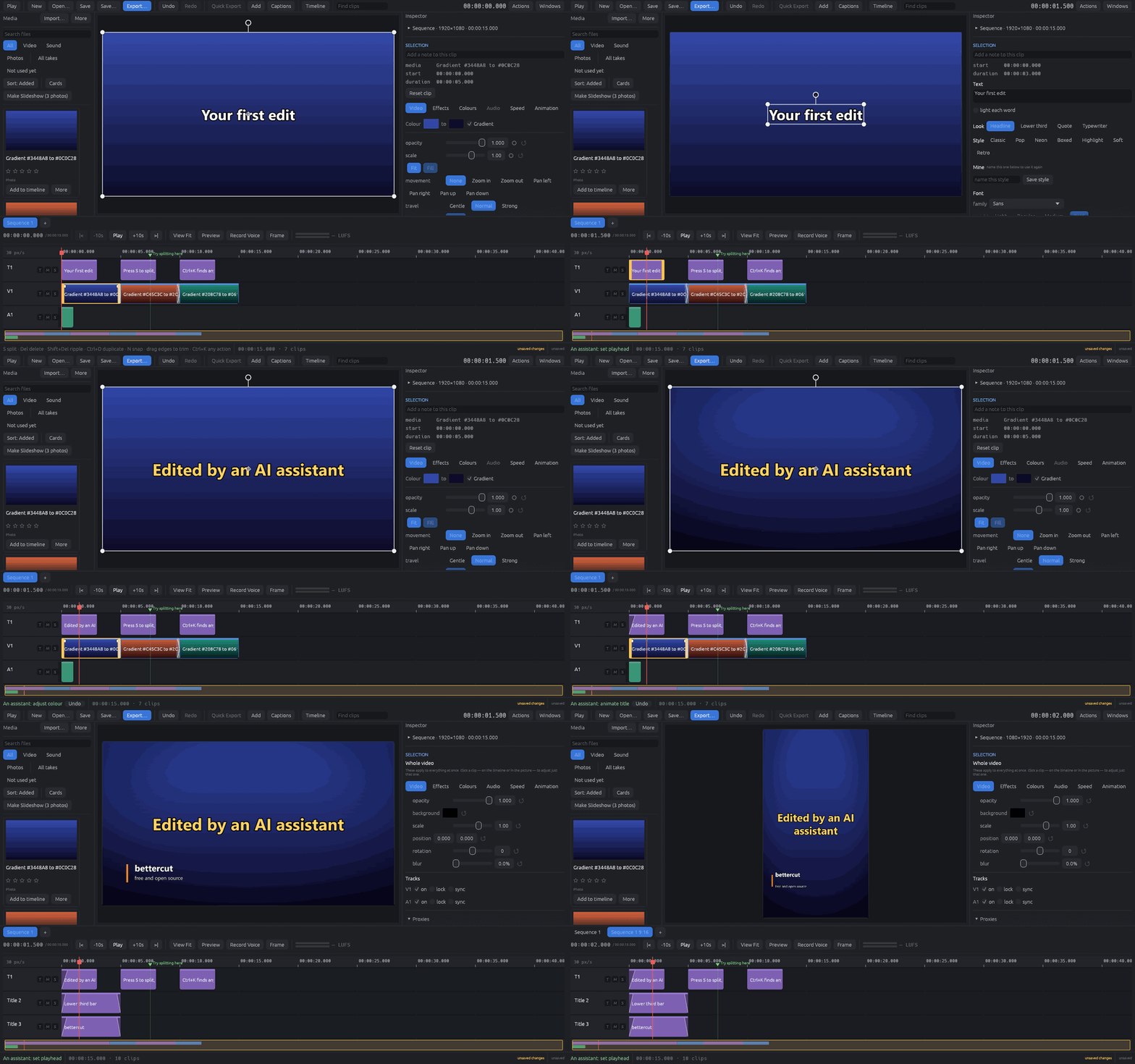
bettercut comes with an MCP server, so Claude, GitHub Copilot, Cursor, Codex, Gemini — any assistant that speaks the Model Context Protocol — can edit with you. Ask it to cut the pauses out of an interview, title every speaker, make a vertical copy for Shorts, or duck the music under the voice, and watch it happen in the window. Every change it makes is on your undo history, like your own.
1
Install bettercut
The server, bettercut-mcp, comes with the app on Windows and Mac; on Linux the AppImage is the server too.
download 0.6.142
Connect your assistant
In bettercut, Windows → AI Assistant shows the exact setup for your install — Claude, Cursor, VS Code, Windsurf, Codex, Gemini CLI, Zed and more — with a button that adds it for you. It is below too.
3
Ask it to attach
With bettercut open, say "attach to the bettercut app". From then on its edits land in your window as it makes them. It can see what you have selected, so "make this clip warmer" means the one you clicked.
It connects only on your computer, with a key the app makes each time it starts. Without attaching, it edits project files on its own.
Set up your assistant
Pick your system, then your app. YOU is your user name; on Linux, the AppImage is wherever you keep it.
Claude Code
Run once in a terminal:
claude mcp add --scope user bettercut -- "%LOCALAPPDATA%\Programs\bettercut\bettercut-mcp.exe"
Run once in a terminal:
claude mcp add --scope user bettercut -- /Applications/bettercut.app/Contents/MacOS/bettercut-mcp
Run once in a terminal:
claude mcp add --scope user bettercut -- ~/Applications/bettercut-x86_64.AppImage --mcp
Claude Desktop
Add to %APPDATA%\Claude\claude_desktop_config.json
{
  "mcpServers": {
    "bettercut": {
      "command": "C:\\Users\\YOU\\AppData\\Local\\Programs\\bettercut\\bettercut-mcp.exe"
    }
  }
}
Add to ~/Library/Application Support/Claude/claude_desktop_config.json
{
  "mcpServers": {
    "bettercut": {
      "command": "/Applications/bettercut.app/Contents/MacOS/bettercut-mcp"
    }
  }
}
Not available on this system.
Cursor
Add to ~/.cursor/mcp.json
{
  "mcpServers": {
    "bettercut": {
      "command": "C:\\Users\\YOU\\AppData\\Local\\Programs\\bettercut\\bettercut-mcp.exe",
      "args": [
        "--compact"
      ]
    }
  }
}
Add to ~/.cursor/mcp.json
{
  "mcpServers": {
    "bettercut": {
      "command": "/Applications/bettercut.app/Contents/MacOS/bettercut-mcp",
      "args": [
        "--compact"
      ]
    }
  }
}
Add to ~/.cursor/mcp.json
{
  "mcpServers": {
    "bettercut": {
      "command": "/home/YOU/Applications/bettercut-x86_64.AppImage",
      "args": [
        "--mcp",
        "--compact"
      ]
    }
  }
}
Cursor takes only so many tools (about 40 for Cursor, 100 for Windsurf, across every server), so --compact lists bettercut's 32 everyday tools; the assistant finds the rest with find_tools when it needs them. From bettercut 0.6.11; older versions ignore it.
VS Code (GitHub Copilot)
Add to %APPDATA%\Code\User\mcp.json
{
  "servers": {
    "bettercut": {
      "type": "stdio",
      "command": "C:\\Users\\YOU\\AppData\\Local\\Programs\\bettercut\\bettercut-mcp.exe",
      "args": []
    }
  }
}
Add to ~/Library/Application Support/Code/User/mcp.json
{
  "servers": {
    "bettercut": {
      "type": "stdio",
      "command": "/Applications/bettercut.app/Contents/MacOS/bettercut-mcp",
      "args": []
    }
  }
}
Add to ~/.config/Code/User/mcp.json
{
  "servers": {
    "bettercut": {
      "type": "stdio",
      "command": "/home/YOU/Applications/bettercut-x86_64.AppImage",
      "args": [
        "--mcp"
      ]
    }
  }
}
Windsurf
Add to ~/.codeium/windsurf/mcp_config.json
{
  "mcpServers": {
    "bettercut": {
      "command": "C:\\Users\\YOU\\AppData\\Local\\Programs\\bettercut\\bettercut-mcp.exe",
      "args": [
        "--compact"
      ]
    }
  }
}
Add to ~/.codeium/windsurf/mcp_config.json
{
  "mcpServers": {
    "bettercut": {
      "command": "/Applications/bettercut.app/Contents/MacOS/bettercut-mcp",
      "args": [
        "--compact"
      ]
    }
  }
}
Add to ~/.codeium/windsurf/mcp_config.json
{
  "mcpServers": {
    "bettercut": {
      "command": "/home/YOU/Applications/bettercut-x86_64.AppImage",
      "args": [
        "--mcp",
        "--compact"
      ]
    }
  }
}
Windsurf takes only so many tools (about 40 for Cursor, 100 for Windsurf, across every server), so --compact lists bettercut's 32 everyday tools; the assistant finds the rest with find_tools when it needs them. From bettercut 0.6.11; older versions ignore it.
Codex (OpenAI)
Add to ~/.codex/config.toml
[mcp_servers.bettercut]
command = "C:\\Users\\YOU\\AppData\\Local\\Programs\\bettercut\\bettercut-mcp.exe"
args = []
Add to ~/.codex/config.toml
[mcp_servers.bettercut]
command = "/Applications/bettercut.app/Contents/MacOS/bettercut-mcp"
args = []
Add to ~/.codex/config.toml
[mcp_servers.bettercut]
command = "/home/YOU/Applications/bettercut-x86_64.AppImage"
args = ["--mcp"]
Gemini CLI
Add to ~/.gemini/settings.json
{
  "mcpServers": {
    "bettercut": {
      "command": "C:\\Users\\YOU\\AppData\\Local\\Programs\\bettercut\\bettercut-mcp.exe"
    }
  }
}
Add to ~/.gemini/settings.json
{
  "mcpServers": {
    "bettercut": {
      "command": "/Applications/bettercut.app/Contents/MacOS/bettercut-mcp"
    }
  }
}
Add to ~/.gemini/settings.json
{
  "mcpServers": {
    "bettercut": {
      "command": "/home/YOU/Applications/bettercut-x86_64.AppImage",
      "args": [
        "--mcp"
      ]
    }
  }
}
Zed
Add to %APPDATA%\Zed\settings.json
{
  "context_servers": {
    "bettercut": {
      "command": "C:\\Users\\YOU\\AppData\\Local\\Programs\\bettercut\\bettercut-mcp.exe",
      "args": []
    }
  }
}
Add to ~/.config/zed/settings.json
{
  "context_servers": {
    "bettercut": {
      "command": "/Applications/bettercut.app/Contents/MacOS/bettercut-mcp",
      "args": []
    }
  }
}
Add to ~/.config/zed/settings.json
{
  "context_servers": {
    "bettercut": {
      "command": "/home/YOU/Applications/bettercut-x86_64.AppImage",
      "args": [
        "--mcp"
      ]
    }
  }
}
LM Studio
Add to ~/.lmstudio/mcp.json
{
  "mcpServers": {
    "bettercut": {
      "command": "C:\\Users\\YOU\\AppData\\Local\\Programs\\bettercut\\bettercut-mcp.exe"
    }
  }
}
Add to ~/.lmstudio/mcp.json
{
  "mcpServers": {
    "bettercut": {
      "command": "/Applications/bettercut.app/Contents/MacOS/bettercut-mcp"
    }
  }
}
Add to ~/.lmstudio/mcp.json
{
  "mcpServers": {
    "bettercut": {
      "command": "/home/YOU/Applications/bettercut-x86_64.AppImage",
      "args": [
        "--mcp"
      ]
    }
  }
}
Kiro
Add to ~/.kiro/settings/mcp.json
{
  "mcpServers": {
    "bettercut": {
      "command": "C:\\Users\\YOU\\AppData\\Local\\Programs\\bettercut\\bettercut-mcp.exe"
    }
  }
}
Add to ~/.kiro/settings/mcp.json
{
  "mcpServers": {
    "bettercut": {
      "command": "/Applications/bettercut.app/Contents/MacOS/bettercut-mcp"
    }
  }
}
Add to ~/.kiro/settings/mcp.json
{
  "mcpServers": {
    "bettercut": {
      "command": "/home/YOU/Applications/bettercut-x86_64.AppImage",
      "args": [
        "--mcp"
      ]
    }
  }
}
opencode
Add to ~/.config/opencode/opencode.json
{
  "mcp": {
    "bettercut": {
      "type": "local",
      "command": [
        "C:\\Users\\YOU\\AppData\\Local\\Programs\\bettercut\\bettercut-mcp.exe"
      ],
      "enabled": true
    }
  }
}
Add to ~/.config/opencode/opencode.json
{
  "mcp": {
    "bettercut": {
      "type": "local",
      "command": [
        "/Applications/bettercut.app/Contents/MacOS/bettercut-mcp"
      ],
      "enabled": true
    }
  }
}
Add to ~/.config/opencode/opencode.json
{
  "mcp": {
    "bettercut": {
      "type": "local",
      "command": [
        "/home/YOU/Applications/bettercut-x86_64.AppImage",
        "--mcp"
      ],
      "enabled": true
    }
  }
}
Any other MCP app
Most take this in their MCP server settings, often a file named mcp.json.
{
  "mcpServers": {
    "bettercut": {
      "command": "C:\\Users\\YOU\\AppData\\Local\\Programs\\bettercut\\bettercut-mcp.exe"
    }
  }
}
Most take this in their MCP server settings, often a file named mcp.json.
{
  "mcpServers": {
    "bettercut": {
      "command": "/Applications/bettercut.app/Contents/MacOS/bettercut-mcp"
    }
  }
}
Most take this in their MCP server settings, often a file named mcp.json.
{
  "mcpServers": {
    "bettercut": {
      "command": "/home/YOU/Applications/bettercut-x86_64.AppImage",
      "args": [
        "--mcp"
      ]
    }
  }
}
86 tools
Each is one of the editor's own commands — the same one a click runs — so whatever the assistant does, Ctrl+Z undoes. It can look at any frame of the edit (preview_frame) to check its own work. It also offers ready-made requests — tighten_interview,make_short, cut_to_the_beat,title_card, make_it_cinematic,clean_up_sound — which Claude Code, VS Code and Gemini CLI list as slash commands.
Working with you
- attach_to_app
- detach_from_app
- get_selection
- select_clips
- set_playhead
Projects
- new_project
- open_project
- save_project
- describe_project
- list_templates
- apply_template
- copy_as_shape
- switch_sequence
- preview_frame
- contact_sheet
- undo
- redo
- history
- batch
- export
- export_status
- organise_media
- remove_unused_media
Cutting
- import_media
- add_to_timeline
- split_clip
- delete_clip
- move_clip
- trim_clip
- remove_silences
- split_at_scenes
- mark_beats
- add_marker
- freeze_frame
- set_speed
- speed_ramp
- reverse_clip
- remove_range
- close_gaps
- split_into
- loop_clip
- boomerang
- hold_last_frame
- group_clips
- set_lane
Look
- set_transform
- picture_in_picture
- adjust_colour
- apply_filter
- set_effect
- set_opacity
- set_movement
- animate
- add_transition
- set_fades
- add_colour
- green_screen
- crop
- transition_every_cut
- whole_video_look
- animate_clip
- flip_and_mirror
- set_blend
- remove_flicker
Words and graphics
- add_title
- style_title
- animate_title
- add_lower_third
- add_shape
- add_sticker
- add_timer
- add_captions
- import_captions
- export_captions
- chapters
Sound
- set_volume
- normalise_volume
- duck_under_voice
- enhance_voice
- mute_clip
- shape_sound
- fit_music
- add_sound_effect
- voice_effect
- split_left_right
- add_sound_tracks
The full reference is in the README, and the server is in the same open-source repository as the editor.